Riff: Fast Easy Photo Edits
- 4.2
- Rating
- 50.00K
- Installs
- Free
- Price

 Analysis by App-foxy
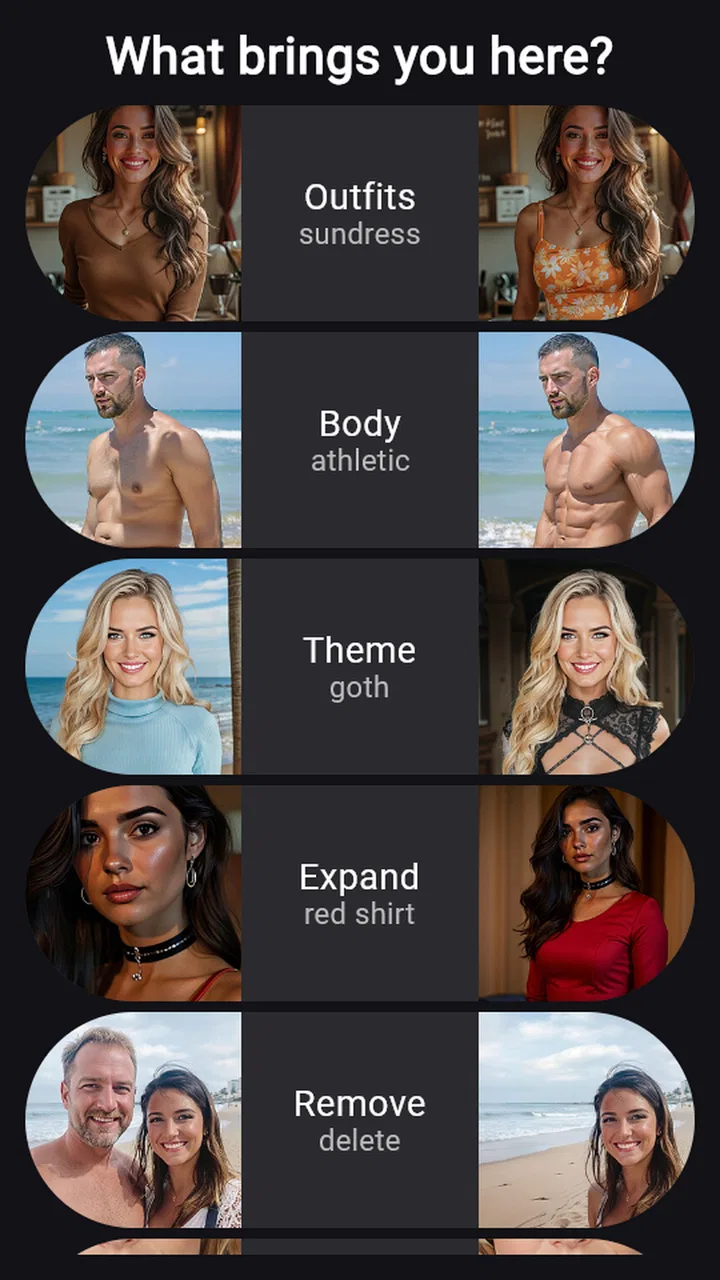
I tried Riff: Fast Easy Photo Edits as a quick photo-editing app rather than a full replacement for a desktop editor, and that distinction matters. Its focus is straightforward: adjust the person in a picture, change clothing, alter body shape, add visual details, or clean away distracting elements. I found the idea appealing because these are the edits people often want after taking a casual photo, yet they can be awkward to achieve with ordinary mobile editing tools.
The app belongs to the photography category and is developed by Riff AI. It is free to install, with optional purchases ranging from $4.99 to $89.99 per item. That makes it easy to try without committing immediately, although anyone planning frequent edits should pay attention to where the free experience ends. The app is rated for Everyone, supports Android 8.0 and later, and has reached over 50 thousand installs. Its average rating is 4.2 from more than 500 ratings, which suggests a generally positive reception while still leaving room for a few rough edges.
How Riff feels to use in everyday editing
I find the everyday appeal of this kind of editing is less about making every photo look polished and more about having a quick way to test one clear idea. Before opening an editor, I decide what I want to keep intact and what I’m willing to change; that small choice makes the result easier to judge. From there, the bigger question is whether that convenience remains useful after the first burst of curiosity.
You May Also Like

 Pandora - Music & Podcasts
Pandora’s Music Is Easy to Start, but Harder to Recover
Pandora’s strength is its low-effort path from a seed to a station. Its weak spot is how much confidence it asks you to place in connection, setup, and quiet recovery.

 8 Ball Pool
 Is Built on Rivalries, Rematches, and Routine
A close look at the rivalries, rematches, shared routines, and unanswered safety questions that turn a quick pool match into a persistent mobile community.

 Samsung Music
’s Quiet Strength Is Playing What You Already Own
Its reach comes less from spectacle than from dependable access to a personal library. That simplicity is both the app’s strongest retention engine and its ceiling.

 AccuWeather: Weather Radar
AccuWeather Review: A Quick, Clear Forecast for Everyday Decisions
For everyday plans, the best forecast is the one you can understand quickly. AccuWeather makes rain timing, radar, and local conditions easy to act on, with a few trade-offs.

 Hill Climb Racing
Why Hill Climb Racing Still Turns Crashes Into One More Run
A tiny car, a bumpy hill and one more upgrade: Hill Climb Racing keeps resurfacing because its simple chaos makes every near-miss feel personal.

 AliExpress - Shopping App
AliExpress Makes Global Shopping Feel Personal, but Shoppers Bear the Risk
AliExpress turns a global marketplace into a pocket-sized discovery engine. Its reach is useful, its shopping loop compelling, and its trade-offs easy to miss.
More From Our News Desk
View All News


Readability and navigation come before creative effects
What I appreciate most about this type of editor is the reduced decision-making. Instead of opening a large toolbox filled with curves, layers, masks, and technical controls, I can begin with a specific goal: improve the outfit, modify the silhouette, insert a detail, or remove something that pulls attention away. That goal-based approach is friendlier for someone who wants a finished image rather than a lesson in photo manipulation.
For a first-time user, the most useful habit is to decide what should remain untouched before making an edit. A portrait with a clear subject and a simple background gives the app a better chance of separating the person from the surroundings. I would not begin with a crowded group photo or a picture where clothing blends into the background. Starting with a clean image makes the process easier to judge and reduces the temptation to blame the controls for a difficult source photo.
The name Riff is short and memorable, but the real value is in the task-oriented concept behind it. I could think in plain language about the result I wanted instead of translating it into technical editing steps. That is especially helpful for people who are comfortable taking photos but find conventional editing apps visually busy. A simpler route can also benefit users who have limited attention, are working on a small screen, or are editing while away from a desk.
There is a trade-off, though. A focused interface can feel restrictive when I want precise control over a small area. Traditional editors usually expose more adjustment tools, and that extra complexity is useful when the image needs careful retouching rather than a broad AI-assisted change. Riff makes more sense when the desired transformation is easy to describe and the exact manual process would otherwise take too long.
Small-screen use and different ways of seeing
Photography apps are judged visually, so readability is not only about text size. It is also about whether the original image, the edited image, and the strength of the change are easy to distinguish. When an edit is subtle, I prefer to inspect the result at full size and then zoom out to see whether it still looks natural. A change that seems convincing up close can look exaggerated when viewed as a complete portrait.
For users with reduced vision, this workflow is important. I would recommend using the clearest available source photo, avoiding edits that depend on tiny details, and checking the final image in more than one viewing condition. A bright screen can reveal different problems from a dim room, while a larger display may make edge errors easier to notice. These are practical habits rather than special app functions, but they make the results more dependable.
Users who have difficulty distinguishing colors may want to judge edits by shape, texture, and overall balance instead of relying only on a new shade of clothing or a subtle color change. The app’s appeal is not limited to color-based transformations: removing a distracting object or adding a visible detail can be easier to evaluate through structure and placement. I would still keep the original photo so that comparisons remain possible.
People who are sensitive to visual clutter may prefer the app’s narrower purpose over a conventional editor packed with menus. Conversely, anyone who needs a highly controlled, predictable result may find AI-assisted changes less comfortable. The important question is not whether the app can make a dramatic difference, but whether the result remains understandable and acceptable after the automatic transformation.
Motor considerations: fewer steps, but not zero effort
A mobile editor can be difficult for users who have limited dexterity, hand tremors, or trouble with repeated tapping. Riff’s appeal is that it aims at larger creative outcomes rather than requiring a long sequence of tiny brush strokes. That can reduce the amount of precise finger work compared with manually masking a jacket, reshaping a body, or removing a background object pixel by pixel.
Still, AI editing does not remove every motor challenge. Selecting a photo, choosing an edit, reviewing the outcome, and correcting an unsatisfactory result all require interaction. If the image needs several attempts, the repeated cycle may become tiring. I would approach the app with a prepared photo and one clearly defined change instead of trying to transform everything at once.
A useful technique is to make the most important edit first, save or preserve that version, and only then experiment further. This protects the original and prevents a long chain of changes from becoming difficult to undo mentally. It also helps users who need to pause between steps. For someone editing with one hand while commuting or waiting in a public place, this staged approach is more manageable than treating the app like a full creative session.
That same advice applies to anyone who becomes fatigued by visual or motor concentration. The app is best suited to short, purposeful sessions. I would not choose it for a large batch of images requiring identical precision unless the workflow proves comfortable after a small test.
Situational access: where the app is genuinely useful
A realistic example is preparing a profile photo after an ordinary day out. Perhaps the lighting is fine, the pose works, but a coat looks untidy or a sign in the background competes with the face. With a conventional editor, I might spend time searching for a clone tool, a reshape control, and a selection method. Riff’s focused approach is better suited to making that kind of quick correction without turning the task into a project.
Another useful situation is trying out an outfit idea before deciding whether to buy or wear it. I would treat the result as a visual experiment, not as a reliable representation of fabric, fit, or color. The app can help me imagine a direction, but it should not replace seeing the real garment or checking how it moves on an actual body.
It can also help with personal storytelling. Adding a detail or changing the visual emphasis of a photo may make an image more suitable for a private mood board, a casual post, or a creative concept. For users who find traditional compositing intimidating, the ability to explore an idea directly on a phone lowers the entry barrier.
Situational access also includes the device itself. Since the minimum operating system is Android 8.0, the app is not limited to only the newest Android phones. That is helpful for people who keep an older but functional device. At the same time, the experience can vary with screen size, processing capability, and the quality of the original camera image. I would test one non-important photo first before relying on it for an image that matters.
The age rating of Everyone makes the app broadly approachable from a content-classification perspective, but that should not be confused with every edit being appropriate for every context. Changing someone’s appearance can affect consent, self-image, and how a photo is understood. I would use it on my own pictures or with clear permission, especially when changing body shape or clothing.
Three workflows that reveal more than the basic pitch
The first workflow is a conservative cleanup pass. I begin by removing only the most distracting element, then review the entire image before making any appearance change. This order is useful because a background distraction can make a portrait seem worse than it really is, and removing it may eliminate the need for a stronger body or outfit edit. It also keeps the final image closer to the original.
The second is a comparison workflow for body-type edits. I would create one version with a modest change and compare it against the untouched photo before deciding whether to continue. The non-obvious benefit is that it separates curiosity from commitment: I can explore an idea without letting the first dramatic result define what the photo should become. This is particularly important for users who may be sensitive about appearance.
The third is an accessibility-minded review loop. After making an edit, I inspect the face, hands, clothing edges, and background separately, then look at the image as a whole. These areas often carry the visual clues that reveal an artificial result. Checking them in stages is easier than judging the entire picture at once, especially for users who find dense visual information overwhelming.
These workflows also show where Riff is strongest: quick visual experimentation with a clear subject. It is less convincing as a precision retouching environment, where I may need exact control over individual pixels, consistent adjustments across many photos, or a repeatable professional process.
Where the experience still creates barriers
The biggest barrier is the uncertainty that comes with AI-based editing. A result can be attractive at a glance but still contain awkward transitions, altered proportions, or details that do not belong. This matters more when the edit changes a person rather than simply removing a small object. I would never assume that a successful preview is automatically ready to publish.
Another concern is the cost structure. The app is free to start, but optional purchases can reach $89.99 per item. That wide range means the practical value depends on how much access a regular user receives without paying and whether the available purchase matches their needs. I would try the simplest personal workflow first and decide from actual use, rather than paying in advance for features I might rarely use.
There is also a social barrier: appearance edits can unintentionally promote unrealistic expectations. Changing body types or outfits may be fun and creative, but repeated use can make ordinary photos feel inadequate. I think the healthiest approach is to treat the app as an editing tool for expression, not as a correction mechanism for a person’s real appearance.
For users who need strong control over privacy, image handling, or repeatable professional output, I would read the app’s current permissions and policies carefully before using sensitive photos. I cannot treat a visual editor as automatically suitable for confidential material simply because it is convenient. Family images, identity documents, medical situations, and workplace material deserve extra caution.
People who need advanced accessibility support may also want to test the complete workflow personally. A clean concept does not guarantee that every control, preview, or result will work equally well with a particular device setup or assistive method. If a user depends on highly predictable focus behavior, detailed spoken feedback, or exact keyboard-style control, a mature conventional editor may be the safer choice.
How it compares with ordinary photo editors
Compared with a standard mobile editor, Riff is more approachable for transformations that would normally require selection and masking. It is a better fit when I want to ask, in effect, “What would this outfit or silhouette look like?” rather than manually constructing the answer. It also feels more relevant to casual portrait editing than an app centered on filters, exposure, or color grading.
Ordinary editors remain better for controlled corrections. If I need to straighten a horizon, balance exposure, sharpen a particular area, create a consistent look across a set of images, or make a tiny retouch that must remain exact, I would choose a conventional tool. Those apps may take longer to learn, but their manual nature can be an advantage when predictability matters more than speed.
Riff also differs from social camera apps that mainly offer live effects. Its appeal is in changing an existing photo with a specific purpose, not simply applying a temporary face filter while taking a picture. That makes it more useful after the photo has already been captured, although users seeking playful real-time effects may find another category more suitable.
Who should try it, and who should skip it
I would recommend Riff to casual portrait photographers, social-media users, creative hobbyists, and anyone who wants to explore clothing or appearance changes without learning a complex editor. It is especially promising for people who become discouraged by layers, masks, and dense adjustment panels. The free starting point makes experimentation less intimidating.
I would suggest skipping it if the main goal is professional retouching, exact restoration, batch consistency, or complete manual control. I would also be cautious if the user is very sensitive to changes in body appearance or needs a guaranteed faithful representation of clothing and proportions. In those cases, a traditional editor or an unedited photograph may serve the purpose better.
Before using it seriously, I would check four things in practice: whether the app handles the person’s pose correctly, whether clothing edges remain believable, whether background changes look clean, and whether the available free workflow is enough for the intended use. Those checks answer more than a quick glance at the feature list because they connect the app to the user’s actual photos and comfort level.
My inclusive verdict
Riff: Fast Easy Photo Edits is an approachable photography app built around a narrow but useful idea: make meaningful changes to people and scenes without demanding traditional editing expertise. I like it most as a quick experimentation tool, particularly when a photo needs a visual concept rather than painstaking correction.
Its accessibility value comes from reducing technical complexity and shortening the path from an ordinary photo to a noticeable result. That can support users with limited editing experience, limited time, or difficulty with long sequences of precise manual actions. However, the app does not remove the need for careful review, and AI-generated changes can introduce their own problems.
My recommendation is to start conservatively, preserve the original, and inspect every important area before sharing an edited image. Use it for personal creativity, outfit exploration, and distraction removal, while choosing a more controlled alternative for professional or sensitive work. With that mindset, the free app is worth trying; just remember that convenience is its strength, not absolute precision.
Riff runs on Android 8.0 and later, carries an Everyone content rating, and is currently listed with a version identified by a June 2026 timestamp. For me, those details reinforce its role as an accessible experiment for a broad range of Android users, provided they approach the optional purchases and appearance-changing tools thoughtfully.
FAQs for Riff: Fast Easy Photo Edits
01What is Riff: Fast Easy Photo Edits used for?
Riff: Fast Easy Photo Edits is designed for quickly improving and stylizing photos without requiring advanced editing experience. It focuses on simple adjustments and creative effects that can help users prepare images for social media, messaging apps, or personal collections. The app is aimed at people who want fast results rather than a full professional editing suite with complex tools.
02Is Riff: Fast Easy Photo Edits free to download and use?
The app may be available to download at no initial cost, but some editing tools, effects, or additional features can depend on the version offered through the app store. Before installing, users should check the current listing for subscription details, in-app purchases, advertising information, and any limitations placed on free editing options. Prices and availability may vary by region and platform.
03Does Riff support high-quality photo exports?
Riff can be useful for preparing edited images, but export quality and available resolution may depend on the device, the original photo, and the app’s current settings. Users who need images for printing, professional work, or detailed cropping should review the export options before relying on it. It is best suited to quick everyday edits and online sharing.
04Is Riff: Fast Easy Photo Edits suitable for beginners?
Yes, the app is primarily intended for users who prefer a straightforward editing process. Its appeal comes from making common photo improvements accessible without requiring knowledge of layers, masks, or complicated adjustment panels. Beginners should still take a moment to explore the available controls, preview changes, and confirm the final export, especially when applying stronger filters or automated effects.
05What permissions and privacy considerations should users know about?
Because Riff works with photos, it may request access to images or media stored on the device. Users should review the permission prompts carefully and allow only the access needed for selecting and saving pictures. It is also advisable to read the app’s privacy policy to understand whether photos, usage data, or diagnostic information are processed locally or sent to external services.
Pros
- Quick edits are easy to apply
- even for beginners.
- Useful presets help create a consistent look across photos.
- Crop and adjustment tools cover everyday editing needs.
- The interface feels clean and simple to navigate.
- Edited images can be prepared quickly for social sharing.
Cons
- Some advanced controls may feel limited for experienced editors.
- Certain effects or tools may require in-app purchases.
- Large photos can take longer to process on older devices.
- Preset-heavy editing may reduce creative control over results.
- The app may need regular updates to maintain compatibility.

Riff: Fast Easy Photo Edits
Gallery